Salesforce publishes what fails AppExchange Security Review. It ships a free scanner. The review still takes weeks of calendar.
What it can’t publish is the part where AI-generated Apex looks clean and still fails on CRUD, secrets, or a test suite that doesn’t prove the behavior.
If your plan is “we’ll vibe the package and then see,” stop at the Audit first. Seeing is cheaper when it’s scored.
What AppExchange Security Review actually checks
Security Review is not a vibe check, and it is not a marketing review.
For a managed package it is a hard, paid, queued process. Salesforce’s public material describes a managed-released package, static analysis, dynamic scanning (DAST), false-positive documentation, solution documentation, and a follow-the-data posture.
Salesforce also publishes the top 20 reasons partners fail. The list keeps returning to the same cluster: CRUD and FLS, sharing, hard-coded secrets, debug statements, unsafe script loading, SOQL injection, and stale software versions. CRUD and FLS is first, by a wide margin.
The review fee is the one number we won’t pretend is settled on this page. Different Salesforce-owned pages have shown different figures. Confirm the current fee in writing with your Partner Account Manager before you put it in a budget.
The queue matters more than the fee. Plan on weeks, not days, after a complete submission, and longer if you fail and resubmit. Confirm current timing with your Partner Account Manager and build the listing date around it.
Why AI-generated Apex fails AppExchange Security Review
The generator doesn’t sit in the review.
It has never opened a scanner report. It has never written a false-positive explanation. It has never installed its own package into a clean scratch org and watched the upgrade path fail. It has never wired the License Management App so that “unlicensed” is enforced in code instead of described in a README.
It will give you a class that looks like Apex. It won’t give you a subscriber-org architecture.
That’s why the Finish Score gives CRUD/FLS and secrets 25 points, Code Analyzer and UI architecture 25, and, when a listing is the goal, the AppExchange rule selector 15. The scanner is free. The failure is still expensive.
A clean scanner is not a pass
In October we scored two apps against the AppExchange rule selector in Salesforce Code Analyzer.
An older, pre-production AgileQuote build, written by an outside developer, passed 31 of 37 AppExchange rules, which is 84%. It would still fail Security Review. Two Apex methods run queries the caller controls, a page hands the session ID to the browser, and the selector checks neither SOQL injection nor field-level security.
AgilePDF, built in-house with Claude Code, passes all 37. One passes because of a justified suppression: a session ID used server-side by design, never sent to the browser. Salesforce’s own scanner ignores that suppression, so the reviewer will see the finding. That’s why a written justification ships with the package.
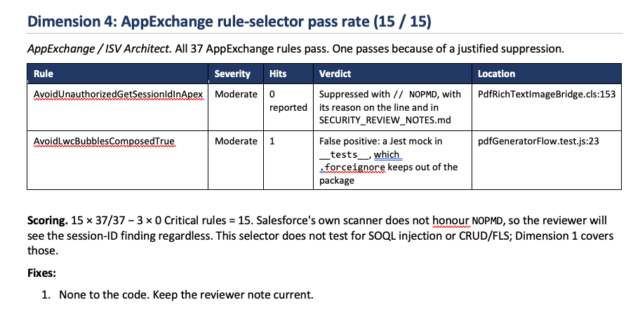
A green report tells you what the rules checked. It doesn’t tell you what the reviewer will.
AppExchange Security Review checklist: before you submit
-
- Enforce CRUD and FLS at every entry point, with
WITH USER_MODEorstripInaccessible. More in Salesforce CRUD and FLS: The Demo That Lied to You.
- Enforce CRUD and FLS at every entry point, with
-
- No SOQL built from user input without bind variables or describe checks.
-
- No session ID sent to the browser. Secrets live in Named Credentials, not code.
-
- No JavaScript loaded from external CDNs. Third-party libraries are current and scanned.
-
- No debug logging of sensitive data.
-
- Code Analyzer with the AppExchange selector, plus a manual read for what it can’t see.
-
- Tests that assert behavior, not just coverage. See why coverage alone lies.
-
- A second-generation managed package that installs and upgrades cleanly in a fresh scratch org, built from source control, not pasted code.
-
- False-positive write-ups, and a written justification for anything that’s by design.
-
- A DAST report for any external endpoint.
Technical debt is this year’s theme. Treat it like one.
Salesforce Ben called 2026 the year of technical debt, thanks to vibe coding. In their 2026 admin survey, 56.3% of admins named managing technical debt as the hardest part of the job.
AI didn’t invent Salesforce debt. It prints it faster, in prettier Apex, with less institutional memory attached.
Developers should keep using AI for the first draft. Somebody has to stop the second draft from becoming the listing.
What Finish for AppExchange is
It is not a bigger Finish Sprint.
Sprint ships an internal app for one org. AppExchange work adds:
-
- Multi-tenant subscriber-org assumptions
-
- Namespace and 2GP packaging
-
- Install and upgrade testing in a clean scratch org
-
- The License Management App wired to enforcement in code
-
- The Security Review submission packet, with one resubmission included in the full engagement
-
- Listing support after the gate
Published band: $45K–$90K, 8–14 weeks. Partial co-build from $25K. Review-and-submit only at $9,500 if the app is already close. Details are on the Finish page.
Start with the Audit either way. A rebuild verdict on day 6 is cheaper than a failed review on day 60.
If you want the listing
Don’t protect the unfinished parts out of pride.
The IKEA effect is real. You assembled the thing. A consultant saying “this won’t pass review” sounds like an insult to the weekend you spent on it.
So we don’t start with an insult. We start with a score.
You keep the idea. You keep the frame. We finish the parts that fail the gate.
FAQ
How long does AppExchange Security Review take?
Weeks, not days, after a complete submission, and longer if you fail and resubmit. Confirm current timing with your Partner Account Manager and plan the listing date around it.
How much does AppExchange Security Review cost?
Confirm with your Partner Account Manager. Don’t copy a number from an old blog post into a statement of work.
What is the most common reason apps fail AppExchange Security Review?
CRUD and FLS enforcement. Salesforce’s top 20 list puts it first by a wide margin. Hard-coded secrets, SOQL injection, insecure script loading and outdated libraries are also on the list.
Can AI-generated Apex pass AppExchange Security Review?
Yes. The reviewer cares what the code does, not who wrote it. AI-generated Apex fails for the same reasons hand-written Apex does. It just produces those mistakes faster.
Can you guarantee a Security Review pass?
No honest firm can. We build to the published failure modes, run the same free scanner Salesforce points at, and include one resubmission in the full AppExchange engagement.
Should I package first and scan later?
Scan first. Package when the score says the package won’t waste the queue.
About CloudFirst Finish
CloudFirst Finish takes a 20–90% built Salesforce app — Apex, LWC, Flow — and makes it documented, tested, and deployable. Finish Audit is $4,500 and five to seven days: a 0–100 Finish Score and a keep / refactor / rebuild verdict. Sprint, AppExchange packaging, and Watch sit behind that score. Prices and the ladder live on cloudfirstlabs.com/finish.
About CloudFirst Labs
CloudFirst Labs is a Tampa Salesforce consulting and AppExchange partner. The same bench that finishes AI-started apps is the bench that connects the Salesforce CRM, PSA, and billing systems MSPs run every day — ConnectWise, Autotask, ServiceNow, NetSuite, Certinia — so closed deals flow into delivery and invoices match what was sold. Co-founded by a former VP of Technology at a $200M MSP.
Connect with John Dionne on LinkedIn and follow CloudFirst Labs for Finish and MSP systems writing, or browse more on the CloudFirst Labs blog.